Monitoring temperature and humidity is essential in IoT and home automation projects. The DHT22 sensor is a popular, accurate, and affordable way to measure these values using Arduino.
Required Components
- Arduino UNO (or any compatible board)
- DHT22 Sensor (AM2302)
- 10kΩ Resistor
- Breadboard and Jumper Wires
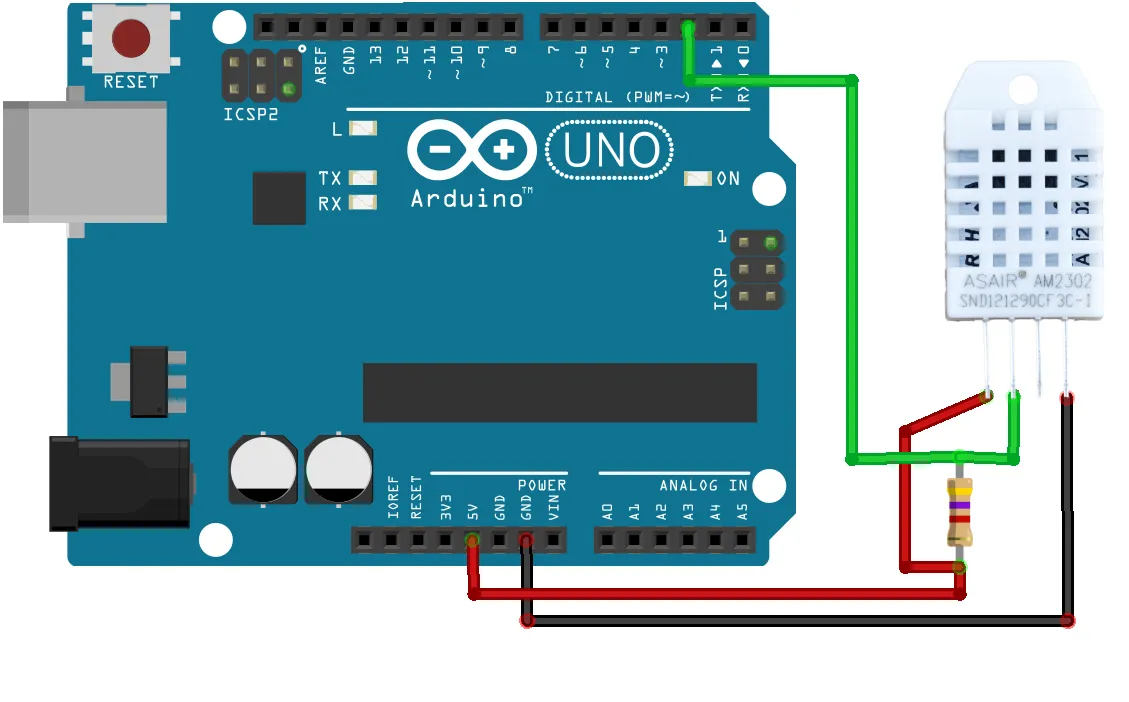
Wiring Diagram
- DHT22 VCC → Arduino 5V
- DHT22 GND → Arduino GND
- DHT22 DATA → Arduino D2
- 10kΩ Pull-up Resistor between DATA & VCC
Library Installation
In Arduino IDE, install the DHT Sensor Library via the Library Manager (Search for "DHT sensor library" by Adafruit).
Sample Arduino Code
#include "DHT.h"
#define DHTPIN 2
#define DHTTYPE DHT22
DHT dht(DHTPIN, DHTTYPE);

void setup() {
  Serial.begin(9600);
  dht.begin();
}

void loop() {
  float temp = dht.readTemperature();
  float hum = dht.readHumidity();
  if (isnan(temp) || isnan(hum)) {
    Serial.println("Failed to read from DHT sensor!");
    return;
  }
  Serial.print("Temperature: ");
  Serial.print(temp);
  Serial.print(" °C, Humidity: ");
  Serial.print(hum);
  Serial.println(" %");
  delay(2000);
}
Storing Data
You can use an SD card module or send data to an IoT dashboard (Blynk, Thingspeak, etc.). For SD card logging, connect an SD module and use the SD library to save readings.
Project Extensions
- Add an LCD or OLED display
- Send alerts when temperature exceeds thresholds
- Integrate with WiFi to upload data online
- Visualize logs in a chart using web dashboard
This project is ideal for IoT beginners and works as the foundation for smart greenhouse, weather station, or connected home monitoring systems. Experiment further and share your results!
 Arduino UNO Rev3